






Skip to content

Enterprise DAM

Manage all your digital assets in one platform built for complex organizations. Control metadata, rights, workflows and distribution across teams, markets and channels.

Extensions of QBank DAM

Extend QBank to match how your organization works. Add automation, templates, portals and custom functionality when you need it.

Connectors & integrations

Connect QBank to the tools your teams already use. From creative tools and CMS platforms to marketing and product systems.

QBank-menu-news
Share assets beyond your organization

Create branded portals where partners, distributors and teams can easily find and download the right assets.

No outdated files. No endless email threads.

QBank DAM for enterprise organizations

Built for complex organizations that need more than asset storage. QBank helps teams across departments, markets, and industries manage, control, and activate digital assets from one governed source.

QBank-manufacturing-menu-rounded-1
Made for manufacturing complexity

Support product communication, technical documentation, and partner access across global teams, product lines, and systems.

QBank-medtech-menu-rounded-600
Built for medtech compliance

Keep digital assets controlled, traceable, and accessible across regulated workflows, teams, and external audiences.

QBank-retail-menu-rounded-1
Designed for retail speed

Help teams manage and distribute approved campaign, product, and brand content across channels, markets, and seasons.

Built for real content workflows

Explore how QBank supports the workflows that matter most across teams, markets, and systems.

Use case - Manage product content across markets
Manage product content across markets

Give global and local teams one structured way to manage approved product content, adapt it for market needs, and keep it consistent across channels.

Use case - Ensure compliant asset versioning
Ensure compliant asset versioning

Keep approved assets under control with clear version history, structured approvals, and traceability across regulated teams and systems.

Use case - Distribute approved content across systems and channels
Distribute approved content across systems and channels

Distribute approved content across websites, platforms, and downstream environments from one controlled source.

Use case - Reduce duplicate assets and improve content reuse
Reduce duplicate assets and improve content reuse

Centralize approved assets, reduce unnecessary duplication, and make it easier to reuse content across teams, systems, and channels.

Use case - Automate content production
Automate content production

Automate repetitive production tasks and keep content work moving faster across teams and workflows.

Sofie Samrell14-10-20212 min read

Too much content? What you need is a DAM!

When it comes to marketing, then the content is arguably what's most important. The marketing and communications teams are constantly producing content for social media and other media channels, daily. However, this means that the amount of content produced easily gets out of hand.

Having multiple stakeholders sharing marketing material, you need to go back and reassess your workflows. Without a digital workflow, chances are you end up doing the same thing over and over again.

In today's digital climate, we produce more content than ever before. But we lack effective ways to organize it. QBank is a Digital Asset Management, a tool for organizing and keeping control of your digital assets. It is a scalable tool, using advanced features and integration possibilities, depending on what your organization needs.

One image - endless versions

Changing the image size and editing leads to many different versions of the same image, before getting to the final version. Keeping track of all the different versions being used on various social media channels can quickly become a problem.

It becomes an even bigger issue if there’s a team sharing assets. The Social Media Manager will need one version for channels on social media, while the Web Editor will need one size of the image for a blog post and website promotions.

Templates, auto-crop, & resizing 

QBank has features such as auto-cropping and resizing. When you upload an image, you need to use the largest version available to be able to convert it into your chosen sizes. You're also able to set up pre-determined image templates according to your publishing needs. With that, you'll get your images or logotypes publishing-ready within seconds, saving you a lot of time while staying consistent.

By setting customized image templates you will increase efficiency and time to market. You're able to use a standard template or use advanced settings for density, background, ICC profile, and much more. Below is an example of how it can look.
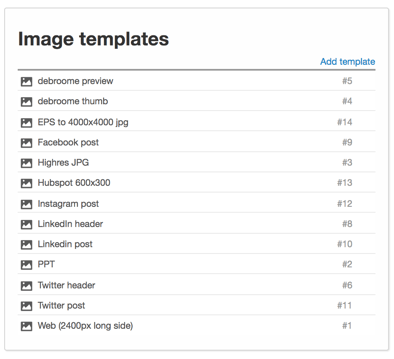
QBank Image Templates

QBank will help you to keep track with advanced version management and you can set workflows where updates to new versions are updated in all channels where the asset is published. This way, you will always keep the original file and make as many versions as you like. All while being in control of your digital assets.

Management and integrations

Using QBank, you have one centralized hub for storage, in other words, you have access to your files within seconds, all in one place. By adding image templates for different media channels, resizing will appear within seconds. All of this is done without messing up the originals and staying in complete control of all versions.

BOOK A DEMO

avatar
Sofie Samrell
QBank's Marketing Manager since early 2016. Sofie has a passion for marketing, communications, and of course, DAM.

RELATED ARTICLES
